
Recurring Events allows providers to create up to 12 events at once directly from the event creation flow. Instead of duplicating events one by one, providers can configure a recurring schedule and publish an entire event series in a single workflow.
Recurring Events helps providers:
- Save time creating repeated events
- Schedule consistent weekly or monthly programming
- Publish multiple events in one setup flow
- Promote related events to players automatically
Examples of recurring programming include:
- Weekly leagues
- Match play
- Drills
- Social events
- Monthly tournaments
Creating a Recurring Event
Recurring Events are created directly within the standard event creation flow.
- Create a new event.
- In Step 1, select Repeat this Event below the date fields.
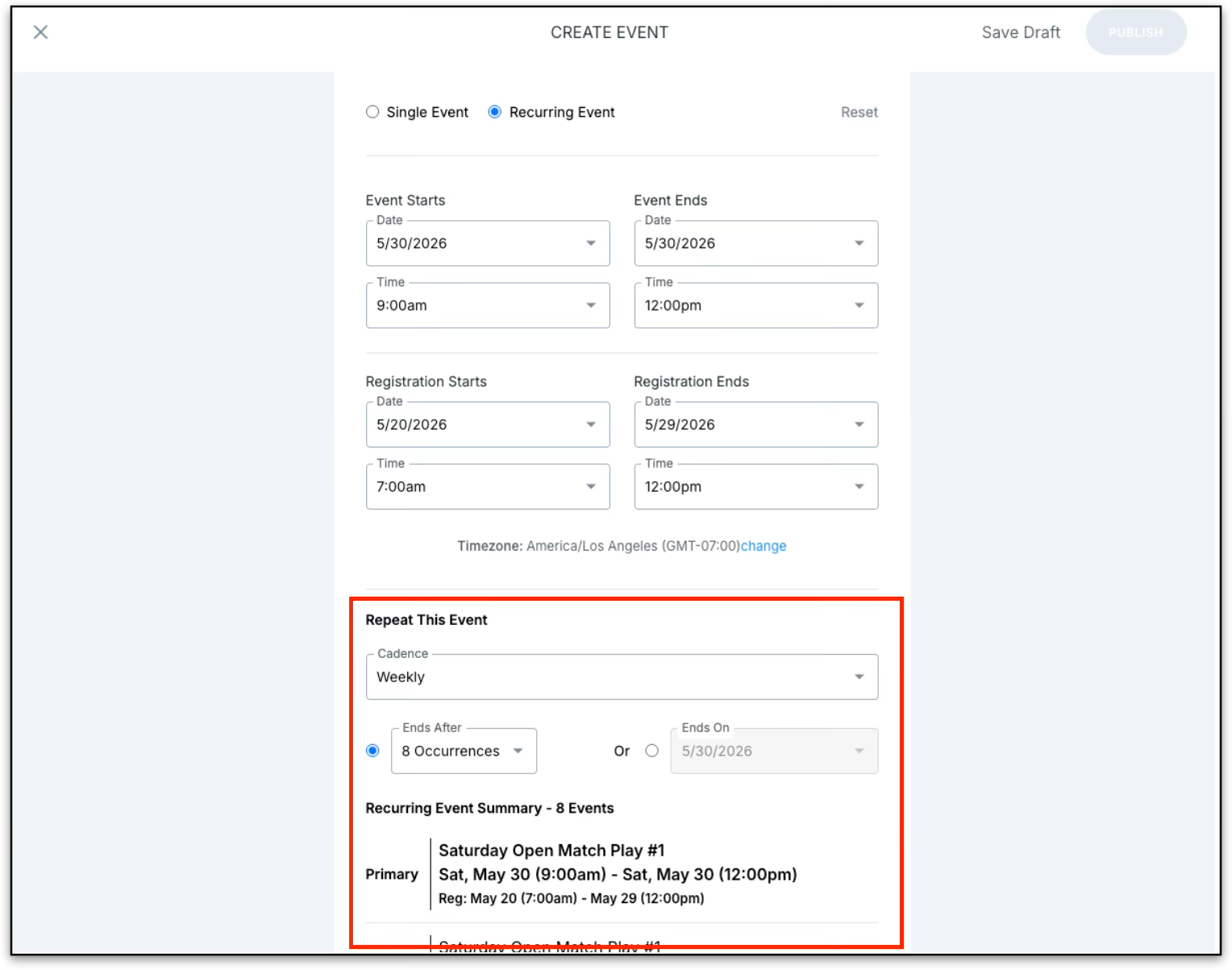
Configure the Recurring Schedule
Providers can choose how often the event repeats.
Available Recurrence Options:
- Daily (single-day events only)
- Weekly
- Monthly
- Yearly
Providers can choose to:
- End after a specific number of occurrences
- End on a specific date
Note: A recurring series can contain up to 12 total events (1 primary event + 11 recurring events).
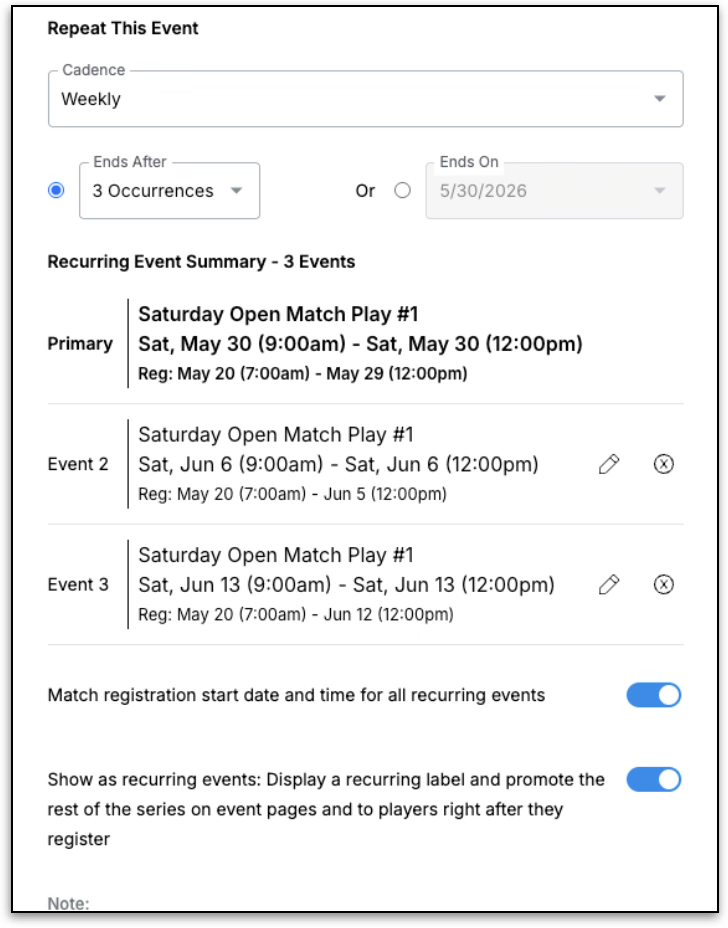
Preview and Edit the Event Series
Before publishing, providers can review the entire recurring series. It includes:
- Event dates
- Event names
- Registration windows
- Publish/draft status
Editing Individual Events
Providers can:
- Edit individual recurring events
- Remove events from the series
- Adjust registration settings per event
Registration Settings
Recurring Events includes registration management options for the full series.
Registration Toggle ON (Default)
- All events share the same registration open date and time.
Registration Toggle OFF
- Registration timing follows each event’s individual start date
- Providers can manually customize registration settings per event
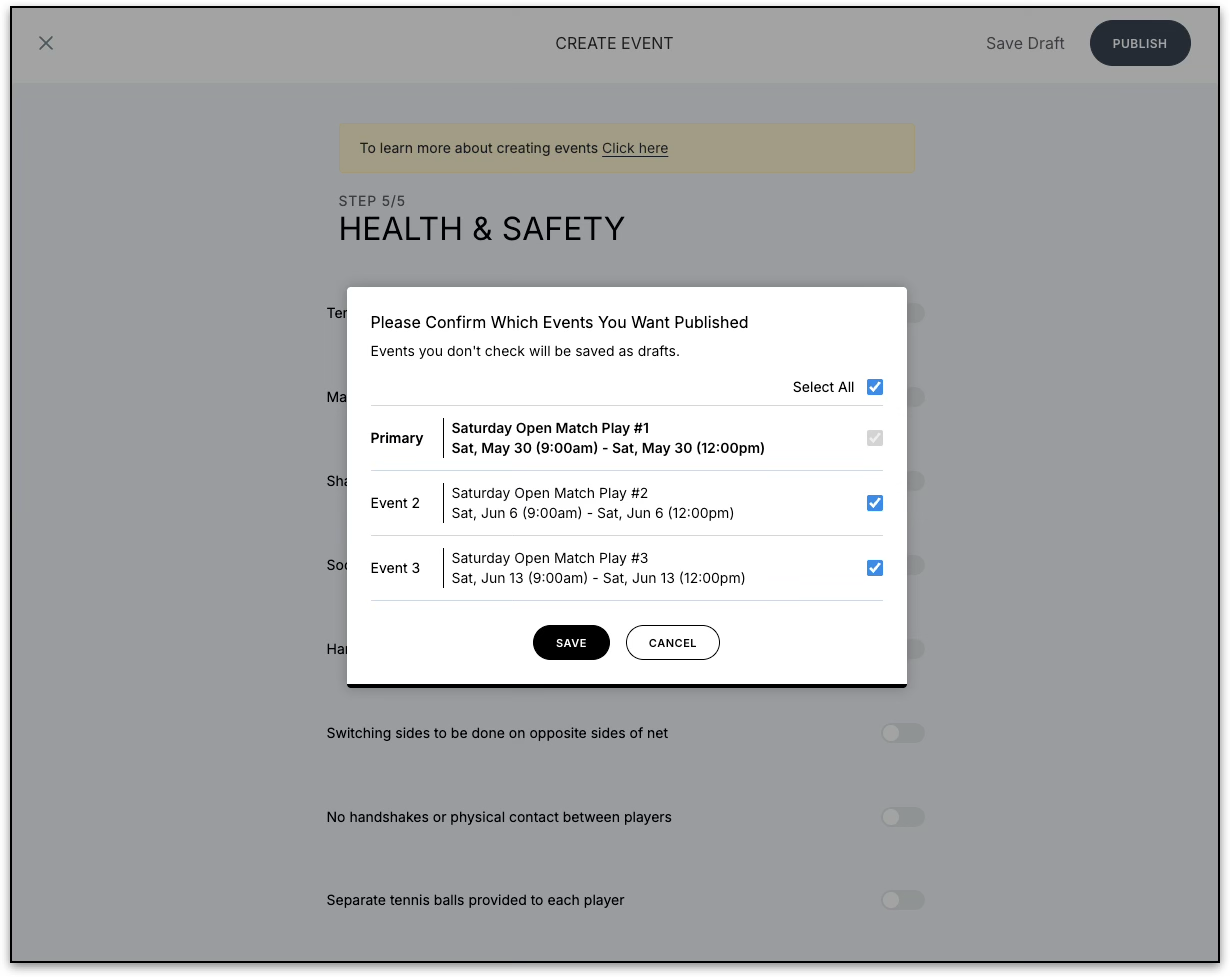
Publishing Recurring Events
Publishing Rules
- The primary event must always be published to create the recurring series.
- Individual recurring events can either:
- Be published immediately
- Be saved as drafts
Saving as Draft
If the entire series is saved as a draft:
- Only the primary event draft is saved
- No recurring events are created until the provider publishes the series
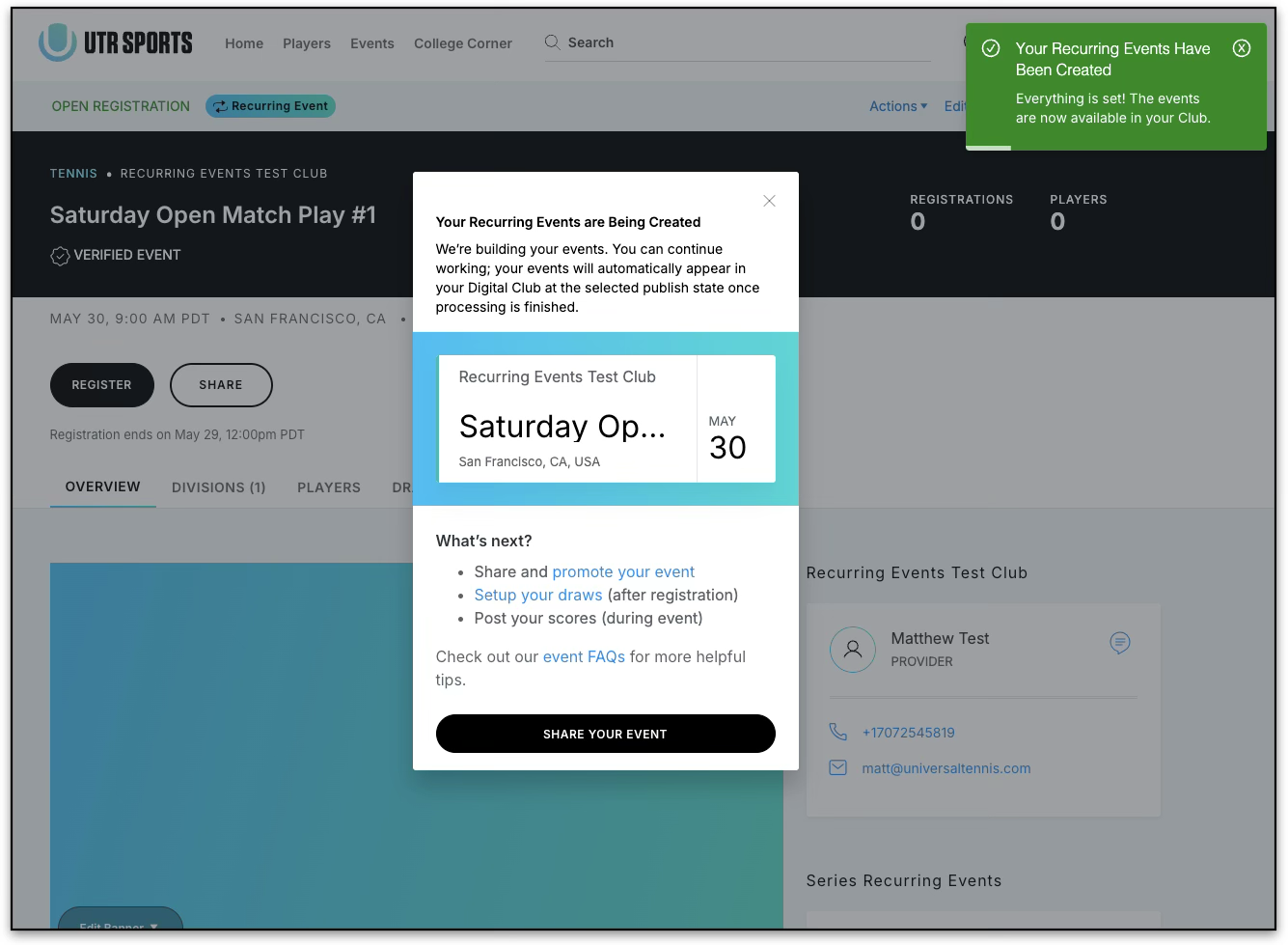
Background Event Creation
Recurring Events are created asynchronously in the background after publishing.
Providers will receive in-app notifications showing:
- Creation progress
- Successful completion
- Any creation failures
Depending on the size of the series, creating an event may take a few moments.
What Happens if Event Creation Fails?
If any recurring event fails to create:
- The entire series automatically rolls back
- No partial or orphaned events are created
- The primary event is preserved as a draft so the provider can retry
Editing or Deleting Events in a Series
After creation, each recurring event becomes an independent standalone event.
Providers can:
- Edit dates
- Update details
- Delete individual events
Note: Changes made to one event do not automatically apply to the rest of the series.
Standard event editing restrictions still apply for events with active registrations.
Player-Facing Recurring Event Display
Providers can control whether players see recurring event promotions.
Show as Recurring Events Toggle
When enabled:
- Players see a “Recurring Event” label on event pages
- Related upcoming events appear in a recurring events section
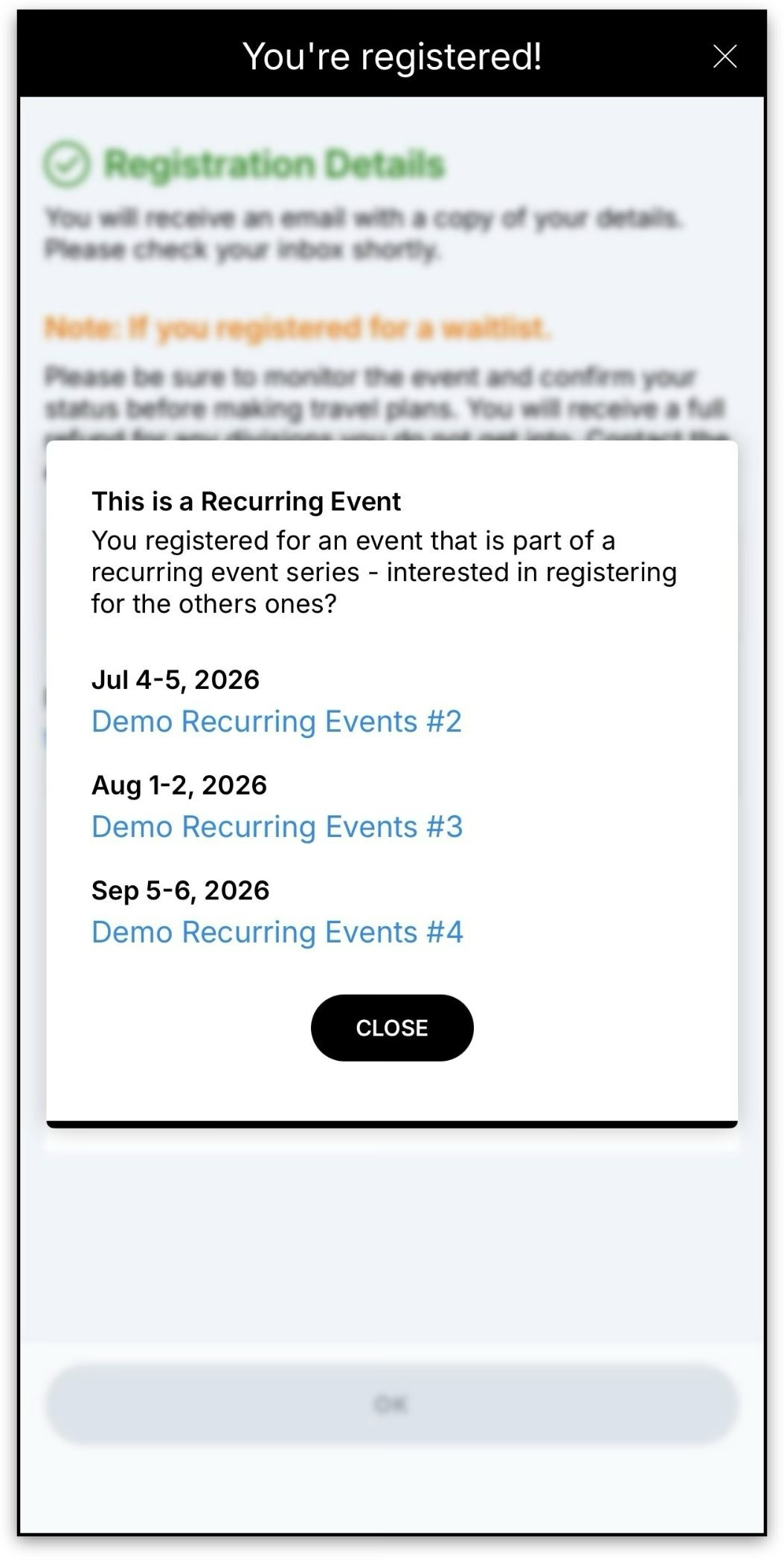
- Players may receive a post-registration prompt to register for additional events in the series
When disabled:
- Players will not see recurring event indicators or promotions
Duplicating a Recurring Event
Duplicating an event from a recurring series creates a standard standalone event.
The duplicated event will not retain recurring event settings.
Frequently Asked Questions
Q: How many events can I create in a recurring series?
A: Providers can create up to 12 total events in a single recurring series.
Q: Can I edit one event without affecting the others?
A: Yes. Each recurring event becomes a standalone event after creation.
Q: Can I save recurring events as drafts?
A: Yes. Providers can save the series as a draft before publishing.
Q: Why don’t I see the recurring events immediately after publishing?
A: Recurring events are created in the background and may take a few moments to appear.
Q: What happens if the recurring event creation fails?
A: The system automatically rolls back the entire series and preserves the primary event as a draft so you can retry.
Q: Can players see all events in the recurring series?
A: Yes, if the provider enables the “Show as recurring events” setting during setup.
Q: Is there an additional cost to use Recurring Events?
A: No. Recurring Events is included for all providers at no additional cost.